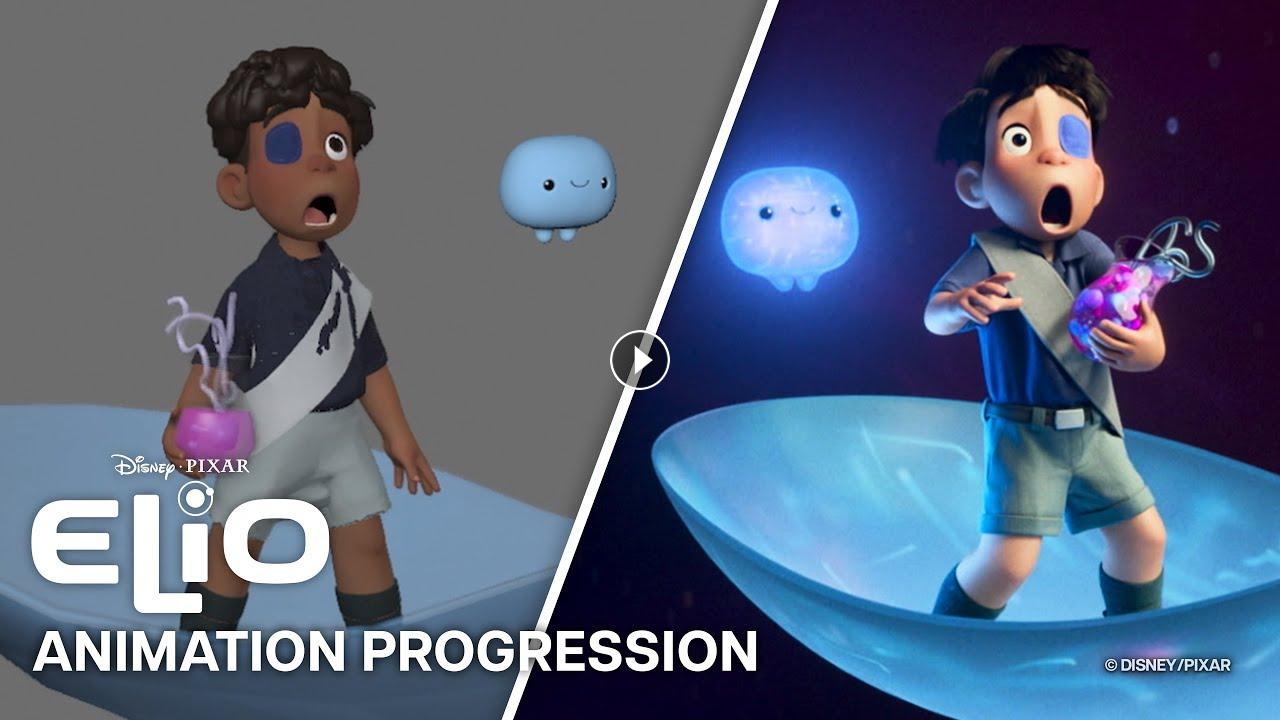
Take a deep dive into the step-by-step process of creating a single scene in Pixar's Elio.
Animation Process Breakdown:
- Storyboards: A hand-drawn, shot by shot version of the entire film built in order to simulate what the movie will be
- Layout: Once sets and characters are built, the camera is placed and the shots are composed for the film
- Animation: The performances of each character are crafted frame-by-frame
- Simulation: Mathematical models are developed and applied in order to create overlapping animation for complex elements like hair and cloth
- Effects: Fire, smoke, water or other "special effects" elements are incorporated into the shot
- Final Lighting: Lighting sources are strategically placed on characters and sets, integrating all shot elements of the final picture into a cohesive aesthetic
Elio now streaming on @disneyplus.
► SUBSCRIBE to the channel to get notified when new Pixar videos are posted: https://www.youtube.com/pixar?sub_confirmation=1
► SUBSCRIBE to Disney+ to stream all of your favorite Pixar shows and movies: https://www.disneyplus.com/
Follow on social media to get the latest news and announcements from Pixar:
TikTok: https://www.tiktok.com/@pixar?lang=en
Instagram: https://www.instagram.com/pixar
Facebook: https://www.facebook.com/Pixar
X: https://x.com/pixar
Experience more stories by subscribing:
/ @Disney
/ @marvel
/ @StarWars
/ @disneyplus
- Category
- CG Movie - Making Of
Up Next
-
02:09

Elio | Teaser Trailer
-
02:09
Incredibles 2 Animation Progression Reel | Pixar
-
01:33
Shot Animation Progression: Ratatouille
-
03:06
Luca Animation Progression | The Big Jump
-
02:36
Hitpig Progression Reel
-
01:20
Monsters University Progression Reel
-
00:46
Elio | "Gun It" Official Clip
-
01:14
The Good Dinosaur Progression Reel | Pixar
-
01:21
Elio | Teaser Trailer
-
03:10
Safe Escape Animation Progression
-
07:57
Scavengers